Keep using existing SDKs
Connect the OpenAI SDK for TypeScript or Python, the Anthropic SDK, or direct HTTP clients to the Lurus base URL.
Your code is never stored. GDPR-compliant processing with immediate data deletion.
View our security standardsCompatibility API
Connect OpenAI and Anthropic SDKs through one API access point. Choose an approved model, copy the snippet, and start with complete or streamed responses.
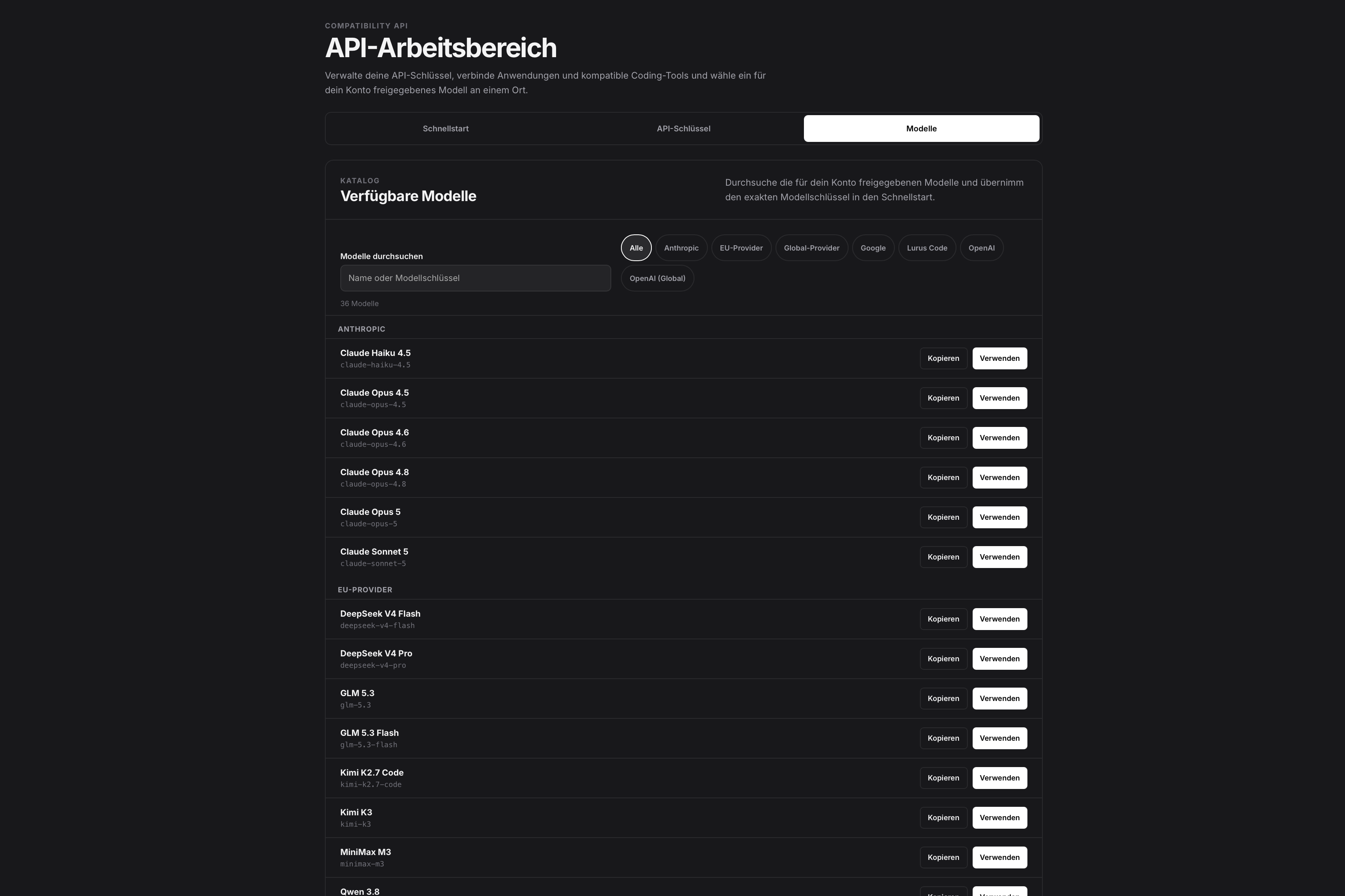
The real API workspace
Less integration work
Keep using established client libraries while managing models, credits, and access centrally through Lurus.
Connect the OpenAI SDK for TypeScript or Python, the Anthropic SDK, or direct HTTP clients to the Lurus base URL.
Fetch available models through /v1/models. Account and team policies determine which models are visible and usable.
All three generation protocols support both complete responses and streaming for interactive applications.
Usage draws from your existing Lurus credits. API keys can be named, assigned an expiration, and revoked immediately.
Public contract
The gateway deliberately supports these text-generation protocols. It does not imply coverage of every OpenAI or Anthropic endpoint.
/v1/models Returns the model catalog that your account and, where applicable, your team may use.
/v1/responses For applications built on the current OpenAI Responses protocol, with complete or streamed output.
/v1/chat/completions For existing Chat Completions clients and direct HTTP integrations.
/v1/messages For applications using the Anthropic Messages protocol and the x-api-key header.
Quickstart
Create a Lurus API key, select an available model key, and configure the client.
import OpenAI from 'openai';

const client = new OpenAI({
  apiKey: process.env.LURUS_API_KEY,
  baseURL: 'https://backend.lurus.sh/v1',
});

const response = await client.responses.create({
  model: '<MODEL_KEY>',
  input: 'Explain this codebase architecture.',
});
The settings supported by a third-party tool depend on its current version. Follow that tool’s official documentation when configuring it.
Three steps
The API workspace guides you from key management to a ready-to-copy example.
Sign in and open API access with its Quickstart, API keys, and Models sections.
Choose an expiration and store the full key securely because it is shown only once.
Choose a protocol, language, response mode, and approved model, then copy the generated configuration.
Control stays centralized
The Compatibility API uses the existing Lurus controls for data processing, credits, model access, and key management.
Lurus Code processes source code and request context with Zero Data Retention.
Customer data and source code are not used to train AI models.
Requests are billed by model usage against your existing personal or team credit balance.
API keys can be revoked immediately. Team administrators centrally control which models members may use.
FAQ
OpenAI Responses, OpenAI Chat Completions, and Anthropic Messages are supported, along with the model list at /v1/models.
Yes. The dashboard Quickstart includes examples for the OpenAI SDK in TypeScript and Python, the Anthropic SDK, and cURL.
Yes. Responses, Chat Completions, and Messages support both complete responses and streaming.
The model list depends on your account and any team policies. The /v1/models endpoint and Models section in the dashboard show the currently available options.
Usage is billed according to the selected model against your existing personal or team credit balance.
Store the key in a secrets manager or environment variable, never expose it in client-side code, and revoke it in the dashboard when it is no longer needed.
Ready for your first request?
Create a key, choose an approved model, and copy the matching snippet into your application.