Your code is never stored. Processing exclusively in EU data centers. GDPR-compliant.
View our security standardsAI Security Scanner
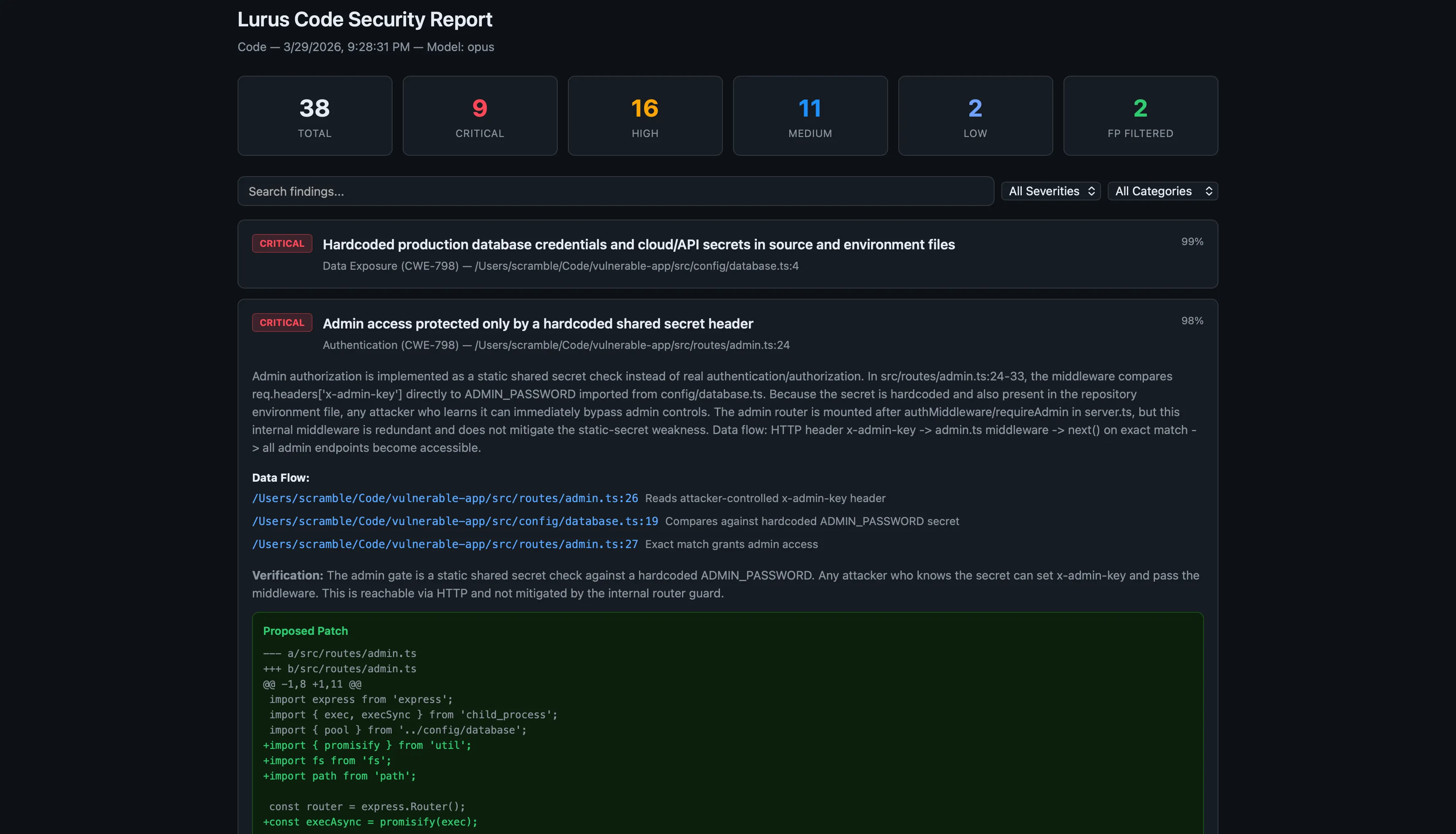
AI-powered GDPR-compliant security scanning. OWASP Top 10 coverage, SARIF output for GitHub Security, auto-patch suggestions. EU-hosted, zero data retention.
Crypto & Secrets
Cryptography review and secret detection in your codebase.
Authentication
Authentication vulnerabilities and common misconfigurations.
Injection Detection
SQL, XSS, and command injection, checked systematically.
Supply Chain
Dependency audits and SBOM for traceable supply chains.
SARIF Output
Standard security report format for tools and CI.
CI Integration
`security-ci` for automated security pipelines.
How the 4-Phase Scan Works
Every scan runs through four specialized phases. Each phase builds on the previous one — from surface discovery to verified, actionable findings with fix suggestions.
1/4 · Discovery
The scanner maps your entire project: directory structure, file types, entry points, configuration files, and dependency manifests. It identifies the attack surface before any analysis begins.
Identifies: source files, configs, package.json / pom.xml / requirements.txt, .env files, Dockerfiles
2/4 · Analysis
Deep static analysis against the OWASP Top 10 and common CWE patterns. The AI model reads code in context — not just pattern-matches — catching logic flaws that regex-based tools miss.
Covers: OWASP A01–A10, hardcoded secrets, insecure deserialization, path traversal, SSRF
3/4 · Verification
Each finding is cross-checked against the codebase to eliminate false positives. The verifier confirms exploitability and assigns severity: Critical, High, Medium, Low, or Info.
Result: verified findings only, false-positive rate <15%, severity assignment per CVSS
4/4 · Remediation
For every confirmed finding, the scanner generates a concrete fix suggestion with a code diff. Suggestions reference the relevant CWE and include a short explanation of the vulnerability.
Output: fix diff, CWE reference, severity, affected file + line number
OWASP Top 10 Coverage
The Lurus Code security scanner covers all 10 OWASP vulnerability categories out of the box — no configuration needed.
Broken Access Control
Missing authorization checks, IDOR, privilege escalation
Cryptographic Failures
Weak ciphers, hardcoded secrets, insecure key storage
Injection
SQL, NoSQL, command, XSS, SSTI injection vectors
Security Misconfiguration
Default credentials, open CORS, verbose error pages
Vulnerable Components
Outdated dependencies with known CVEs, SBOM gaps
Auth Failures
Weak passwords, missing MFA, broken session management
Data Integrity Failures
Unsigned updates, insecure deserialization
Logging Failures
Missing security events, sensitive data in logs
SARIF & GitHub Security Tab
SARIF (Static Analysis Results Interchange Format) is the Microsoft/GitHub standard for security tooling. Lurus Code outputs SARIF by default — which means findings appear directly in the GitHub Security tab, as inline PR annotations, and in any SARIF-compatible CI dashboard.
- Findings appear as inline PR review comments on the exact lines
- GitHub Security tab shows all open, dismissed, and fixed alerts
- SARIF files archive to your repository for audit trails
- Works with GitLab SAST, Azure DevOps, and JetBrains Qodana
lurus security-ci --diff --format sarif --output results.sarif
CI/CD Integration
Drop the security-ci command into any CI pipeline. It runs headless, returns standard exit codes, and posts findings directly to your pull request.
- name: AI Security Scan
  run: lurus security-ci --diff --fail-on high
  env:
    GITHUB_TOKEN: ${{ secrets.GITHUB_TOKEN }}
Exit Codes
GDPR & EU Compliance
Every byte of your source code is processed exclusively on EU-hosted infrastructure. No code is stored after the scan completes. A Data Processing Agreement (DPA) is available for enterprise customers.
EU-only processing
All AI inference runs on servers located in Germany and France. No data ever touches US or non-EU infrastructure.
Zero retention
Source code is discarded immediately after the scan. Nothing is logged, cached, or used for model training.
DPA available
A Data Processing Agreement (Art. 28 GDPR) is available for all paid plans.
Regulated industries
Meets requirements for healthcare (MDR), finance (DORA, PCI-DSS), and public-sector software procurement.
Frequently Asked Questions
How does the false-positive rate compare to Snyk or SonarQube?
Which programming languages are supported?
Can I scan only changed files in a pull request?
lurus security-ci --diff to scan only the files changed since the last commit, or --diff-base main to compare against a specific branch. This keeps scan times short in CI.Is the scanning GDPR-compliant?
What is the difference between lurus security-ci and the /scan slash command?
lurus security-ci is the headless CI command — it exits with a status code and writes a report file. /scan is the interactive chat command — it runs the same scan but streams results in the terminal and lets you ask follow-up questions about each finding.Secure your code
Find vulnerabilities early with specialized scans and standardized SARIF reports.
Get started